In today’s hyper-connected world, where multiple devices stream 4K content, game online, and power smart home ecosystems simultaneously, a robust and reliable Wi-Fi network is no longer a luxury—it’s a necessity. If your current setup struggles with dropped connections, buffering, or slow speeds, upgrading to a Wi-Fi 6 router could be the transformative solution you need. This advanced standard, also known as 802.11ax, is specifically engineered to handle the demands of modern households, offering significant improvements in speed, efficiency, and capacity compared to its predecessors. It’s an investment in a seamless, future-proof digital experience for every device in your home.
Common Types of Wifi 6 Routers
Wi-Fi 6 routers come in various configurations, each designed to cater to different needs and environments, ensuring there’s an ideal choice for nearly every user.
Categorized by Usage Needs
Routers are often tailored to specific user scenarios, providing optimized performance for various demands.
- Routers for Small Homes (Apartments): For smaller living spaces or apartments, basic dual-band Wi-Fi 6 routers (e.g., AX1500 or AX1800) offer substantial upgrades. They provide faster speeds and better handling of multiple devices than older Wi-Fi 5 models, without the need for extensive range or high-end features.
- Routers for Large Homes (Multi-story Houses): Larger homes, especially those with multiple floors, benefit from more powerful standalone routers (AX5400 and above) with strong signal penetration or, ideally, a Wi-Fi 6 mesh system. Mesh systems create a unified network with multiple nodes, eliminating dead zones and ensuring consistent coverage across every corner of the property.
- Routers for Gaming: Gamers require ultra-low latency and dedicated bandwidth. High-end Wi-Fi 6 gaming routers (e.g., AX6000, AX11000) often feature tri-band capabilities, allowing for a dedicated 5GHz or even 6GHz (Wi-Fi 6E) band for gaming traffic. They also include advanced Quality of Service (QoS) settings to prioritize gaming packets, powerful processors, and sometimes 2.5Gbps or 10Gbps WAN/LAN ports.
- Routers for Small Offices: Small office environments demand reliable connections for multiple workstations, video conferencing, and data transfers. Routers with robust security features, sufficient device capacity, and stable performance, often in the mid-to-high AX range, are crucial for maintaining productivity.
|
Our Picks for the Best Wifi 6 router in 2026
As an Amazon Associate I earn from qualifying purchases.
|
||
| Num | Product | Action |
|---|---|---|
| 1 | TP-Link Dual-Band AX3000 Wi-Fi 6 Router Archer AX55 | Wireless Gigabit Internet Router for Home | EasyMesh Compatible | VPN Clients & Server | HomeShield, OFDMA, MU-MIMO | USB 3.0 | Secure by Design |

|
| 2 | ASUS RT-AX1800S Dual Band WiFi 6 Extendable Router, Subscription-Free Network Security, Parental Control, Built-in VPN, AiMesh Compatible, Gaming & Streaming, Smart Home |
|
| 3 | TP-Link AXE5400 Tri-Band WiFi 6E Router (Archer AXE75), 2025 PCMag Editors' Choice, Gigabit Internet for Gaming & Streaming, New 6GHz Band, 160MHz, OneMesh, Quad-Core CPU, VPN & WPA3 Security |
|
| 4 | TP-Link AX1800 WiFi 6 Router (Archer AX21 V5) – Dual Band Wireless Internet, Gigabit, Easy Mesh, Works with Alexa - A Certified for Humans Device, Free Expert Support |
|
| 5 | TP-Link AX5400 WiFi 6 Router (Archer AX73)- Dual Band Gigabit Wireless Internet Router for Streaming, Long Range Coverage |
|
| 6 | TP-Link Archer AX1450 WiFi 6 Dual-Band Wireless Router | up to 1.45 Gbps Speeds (Renewed) |
|
| 7 | NETGEAR Nighthawk WiFi 6 Router (RAX36) – Router Only, AX3000 3 Gbps Wireless Speed – Dual-Band Gigabit Internet – Covers 2,000 sq. ft., 25 Devices – Built-in VPN, USB 3.0, Gaming |
|
| 8 | TP-Link Deco X55 AX3000 WiFi 6 Mesh System - Covers up to 2500 Sq.Ft., Replaces Wireless Router and Extender, 3 Gigabit Ports, Supports Ethernet Backhaul, Deco X55(1-Pack) |
|
| 9 | TP-Link Smart WiFi 6 Router (Archer AX10) – 4 Gigabit LAN Ports, Dual Band 802.11AX Router, Beamforming, OFDMA, MU-MIMO, Parental Controls, Dual-Core 900MHz Processor, Works with Alexa |
|
| 10 | TP-Link Dual-Band BE3600 Wi-Fi 7 Router Archer BE230 | 4-Stream | 2×2.5G + 3×1G Ports, USB 3.0, 2.0 GHz Quad Core, 4 Antennas | VPN, EasyMesh, HomeShield, MLO, Private IOT | Free Expert Support |
|
Categorized by Brand
Several leading manufacturers dominate the Wi-Fi 6 router market, each with a reputation for quality and innovation.
- TP-Link: Known for offering a wide range of routers from budget-friendly options to high-performance gaming devices. TP-Link’s Archer series, such as the Archer AXE75 or Archer AX11000, consistently receive high marks for value and performance.
- ASUS: ASUS is a popular choice, particularly for gamers, with their ROG Rapture series (e.g., GT-AX11000 Pro, GT-AX6000) delivering cutting-edge performance and gaming-specific features. They also offer excellent general-purpose routers like the RT-AX86U Pro.
- Netgear: Netgear’s Nighthawk series (e.g., RAXE300) are recognized for their powerful hardware, extensive range, and robust feature sets, often appealing to users with demanding network needs.
- Linksys: Linksys provides user-friendly routers that emphasize ease of setup and reliable performance, such as the Linksys Hydra Pro 6, making them a good option for average households.
Detailed Comparison Table of the Best Wifi 6 Routers
When choosing a Wi-Fi 6 router, a side-by-side comparison of critical specifications can help clarify which model best aligns with your specific requirements. The market offers a wide array of options, and understanding the nuances between them is key.
Comparison Criteria:
Several factors play a crucial role in determining a router’s overall performance and suitability.
- Wi-Fi Speed: Indicated by the AX number (e.g., AX1800, AX6000), this represents the theoretical maximum aggregate speed across all bands. Higher numbers generally mean more available bandwidth.
- Coverage Range: This refers to how far the Wi-Fi signal can effectively reach, influencing performance in larger homes or multi-story buildings. Factors like antenna design and beamforming technology play a role.
- Simultaneous Device Capacity: Wi-Fi 6 excels at managing numerous connected devices without performance degradation, thanks to technologies like OFDMA and MU-MIMO.
- Security Features: Modern routers offer advanced security protocols like WPA3, parental controls, and built-in network protection to safeguard your home network.
- Price: Routers span a broad price spectrum, from under $100 to over $400, depending on their features, speed, and brand.
Comparison Table:
| Model | Wi-Fi Speed (AX Rating) | Bands | Coverage (Sq. Ft.) | Max Devices | Security Features | Price Range | Best For |
|---|---|---|---|---|---|---|---|
| TP-Link Archer AX50 | AX3000 | Dual-Band | 2,000 | 40+ | WPA3, HomeShield | Mid-Range | Mid-sized homes, general use |
| ASUS RT-AX82U | AX5400 | Dual-Band | 2,500 | 60+ | WPA3, AiProtection | Mid-High | Gaming, multiple users, smart homes |
| Netgear Nighthawk RAXE300 | AXE7800 | Tri-Band (6E) | 2,500-3,500 | 75+ | WPA3, Netgear Armor | High-End | High-performance, Wi-Fi 6E devices |
| Linksys Hydra Pro 6 | AX5400 | Dual-Band | 2,000 | 50+ | WPA3, Parental Controls | Mid-Range | Standard homes, ease of use |
| TP-Link Archer AXE75 | AXE5400 | Tri-Band (6E) | 2,000-2,500 | 60+ | WPA3, HomeShield | Mid-Range | Value-focused Wi-Fi 6E, multiple devices |
“Wi-Fi 6 fundamentally changes how data is transmitted, allowing for a more efficient and less congested network, especially crucial as device counts in homes continue to soar.”
Wifi 6 Router Buying Guide
Selecting the right Wi-Fi 6 router can significantly impact your home network’s performance and stability. A thoughtful approach ensures you pick a device that not only meets your current needs but also accommodates future technological advancements.
Key Factors to Consider When Buying
Careful evaluation of your specific situation will guide you to the most appropriate choice.
- Usage Needs (Number of Devices, Area Size): Assess how many Wi-Fi devices you regularly use and the total square footage of your home. A small apartment with a few devices will have vastly different needs than a large, multi-story house packed with smart home gadgets and heavy streamers. Consider also if you require strong outdoor coverage or penetration through thick walls.
- Budget: Wi-Fi 6 routers range widely in price. Determine your comfortable spending limit, keeping in mind that higher-priced models often come with more advanced features, better performance, and superior build quality. Balance cost with the features truly essential for your network.
- Essential Features (Security, Parental Control, QoS): Prioritize features that matter most to you. Enhanced security (like WPA3 encryption and built-in antivirus), robust parental controls for family safety, and Quality of Service (QoS) settings to prioritize specific traffic (e.g., gaming, video calls) are important considerations.
- Reputable Brands: Stick to well-established brands like TP-Link, ASUS, Netgear, and Linksys. These manufacturers typically offer reliable products, regular firmware updates, and comprehensive customer support, ensuring a better long-term experience.
Tips for Choosing a Wifi 6 Router
Making an informed decision involves a bit of research and foresight.
- Read Specifications Carefully: Pay close attention to the AX rating (e.g., AX1800, AX6000), which indicates maximum theoretical speed. Also, check for the number of bands (dual-band or tri-band), processor speed, and RAM, as these impact overall performance, especially under heavy load.
- Consult User Reviews: Real-world user experiences can provide valuable insights into a router’s actual performance, reliability, and ease of use. Look for consistent feedback on range, speed, and any recurring issues.
- Compare Prices Across Retailers: Prices can vary significantly between different stores and online platforms. Shop around to find the best deal, but be wary of unusually low prices that might indicate refurbished or unauthorized products.
- Check Warranty Policy: A good warranty provides peace of mind. Understand the manufacturer’s warranty period and return policies before making a purchase.
Common Issues and How to Resolve Them
Even with a new Wi-Fi 6 router, you might encounter occasional hiccups. Knowing how to troubleshoot common problems can save you frustration.
- Loss of Connection: Often resolved by a simple router and modem reboot. Unplug both devices, wait 30 seconds, then plug the modem back in, wait for it to fully boot, then plug in the router.
- Slow Speeds: Ensure your router is optimally placed, away from obstructions and other electronics that cause interference. Check for firmware updates, which can improve performance. If issues persist, adjust Wi-Fi channels to less congested ones in your router’s settings.
- Inability to Connect Devices: Older 2.4GHz-only devices may struggle with Wi-Fi 6 networks optimized for 5GHz. Try creating a separate guest network specifically for these older devices or ensure your router’s WPA3/WPA2 mixed mode is correctly configured if WPA3 is enabled.
- Security Vulnerabilities: Regularly update your router’s firmware to patch security flaws. Use strong, unique passwords for your Wi-Fi network and router admin interface. Enable advanced security features like a firewall and network protection if available.
Top Picks Wifi 6 Router by Price Segment
The market offers a diverse range of Wi-Fi 6 routers, ensuring that excellent options are available across all budget categories.
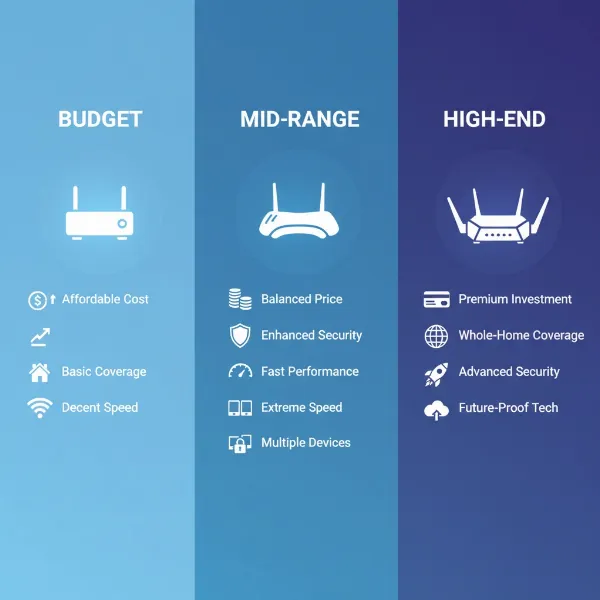
Budget-Friendly Segment (Under $100)
For those looking to upgrade to Wi-Fi 6 without breaking the bank, this segment offers solid performance for everyday needs.
- Advantages: These routers provide the core benefits of Wi-Fi 6, including improved efficiency and better handling of multiple devices, at an accessible price point. They are perfect for smaller homes or users with moderate internet demands.
- Disadvantages: Expect fewer advanced features, potentially lower theoretical speeds (e.g., AX1500-AX1800), and less robust hardware compared to more expensive models. Coverage might be limited in very large homes.
- Product Suggestions:
- TP-Link Archer AX10 (AX1500): Often cited as one of the most affordable entry points into Wi-Fi 6, offering essential features and reliable performance for basic streaming and browsing.
- ASUS RT-AX55 (AX1800): A dependable choice that balances price and performance, offering good speeds and a user-friendly interface for small to medium-sized homes.
Mid-Range Segment ($100-$300)
This segment offers an excellent balance between cost and performance, delivering enhanced features and faster speeds for most households.
- Advantages: Mid-range routers typically offer higher AX ratings (AX3000-AX5400), better coverage, more powerful processors, and additional features like advanced parental controls, robust QoS, and sometimes multi-gigabit Ethernet ports. They are suitable for most modern homes with multiple active users and smart devices.
- Disadvantages: While powerful, they might still lack the absolute top-tier speeds or the dedicated 6GHz band of Wi-Fi 6E found in premium models.
- Product Suggestions:
- TP-Link Archer AXE75 (AXE5400): A standout choice for its Wi-Fi 6E capabilities at a competitive price, providing a dedicated 6GHz band for less interference and higher speeds for compatible devices.
- ASUS RT-AX82U (AX5400): Known for its strong gaming features, excellent performance, and intuitive app control, making it a favorite for gamers and tech enthusiasts alike.
- Linksys Hydra Pro 6 (AX5400): Offers a good balance of performance and ease of use, ideal for families seeking reliable coverage and simple management.
High-End Segment (Above $300)
For the most demanding users, this segment delivers top-tier performance, extensive features, and future-proofing capabilities.
- Advantages: These are the most powerful Wi-Fi 6 and Wi-Fi 6E routers available, boasting the highest AX ratings (AX6000 and above), tri-band or even quad-band configurations, multiple multi-gigabit ports, and advanced software features. They are designed for large homes, competitive online gaming, 8K streaming, and extensive smart home ecosystems.
- Disadvantages: The primary drawback is the significant price tag, which may be overkill for average users who don’t require such extreme performance.
- Product Suggestions:
- Netgear Nighthawk RAXE300 (AXE7800): A premium Wi-Fi 6E router that delivers impressive speeds and range across three bands, ideal for homes with numerous Wi-Fi 6E devices.
- ASUS ROG Rapture GT-AX11000 Pro (AX11000): The ultimate gaming router, offering unparalleled speeds, a dedicated gaming band, and a suite of features designed to minimize lag and optimize the gaming experience.
- TP-Link Archer AX11000 (AX11000): Another high-performance option tailored for gaming and heavy network loads, providing extreme speeds and robust features for a superior online experience.
Conclusion
Upgrading to a Wi-Fi 6 router represents a significant leap forward for your home network, offering not just faster speeds but also greater efficiency and capacity to manage the ever-increasing number of connected devices. Whether you’re a casual browser, a dedicated gamer, or managing a bustling smart home, there’s a Wi-Fi 6 model designed to meet your specific demands. By carefully considering your usage needs, budget, and desired features, you can select the perfect device to unlock a smoother, more reliable, and future-proof internet experience. Have you experienced the difference a Wi-Fi 6 router can make in your daily digital life?
Frequently Asked Questions
What makes Wifi 6 routers better than previous generations?
Wi-Fi 6 (802.11ax) routers improve upon older standards by offering higher speeds, better efficiency through technologies like OFDMA and MU-MIMO, and increased capacity to handle many devices simultaneously. This leads to reduced latency and more reliable connections, especially in crowded network environments.
Is a Wifi 6 router backward compatible with my older devices?
Yes, Wi-Fi 6 routers are fully backward compatible with older Wi-Fi standards (802.11a/b/g/n/ac). Your existing devices will still connect to the network, though they won’t experience the full benefits of Wi-Fi 6 unless they also support the standard.
Do I need Wifi 6E, or is Wifi 6 enough?
Wi-Fi 6E extends Wi-Fi 6 by adding a new 6GHz band, which offers significantly more bandwidth and less interference for compatible devices. If you have many Wi-Fi 6E-ready devices and face severe network congestion, Wi-Fi 6E can provide a substantial upgrade. For most users, Wi-Fi 6 offers excellent performance and is usually sufficient.
How important is the AX rating on a Wifi 6 router?
The AX rating (e.g., AX1800, AX6000) indicates the theoretical maximum aggregated speed across all Wi-Fi bands. A higher AX number generally suggests a more powerful router with greater bandwidth capacity, better suited for demanding applications and numerous connected devices.
Can a Wifi 6 router improve my internet speed if my ISP speed is slow?
A Wi-Fi 6 router can optimize the efficiency and speed of your internal home network, improving communication between your devices and reducing congestion. However, it cannot increase the maximum internet speed provided by your Internet Service Provider (ISP). If your ISP speed is slow, upgrading your router will only help up to that limit.