Are you constantly battling slow internet speeds, buffering, or unreliable connections in your home? As our digital lives become more interconnected, with multiple devices streaming, gaming, and working simultaneously, the demand on our home networks has never been higher. This often leads to frustration with older Wi-Fi standards. Enter the Wifi 6 router, the next generation of wireless technology designed to address these modern challenges head-on. But with newer standards like Wifi 6E and Wifi 7 also emerging, many wonder: is a Wifi 6 router truly worth the investment for your current needs and for future-proofing your network? This comprehensive review will delve into the features, benefits, popular models, and crucial buying considerations to help you make an informed decision for your home or small office.

Popular Types of Wifi 6 Routers
Wifi 6 routers come in a variety of configurations, each designed to meet specific user demands and environments. Understanding these categories is the first step in identifying the best fit for your unique setup. From casual browsing to intensive gaming and large smart home ecosystems, there’s a Wifi 6 router tailored for almost every scenario.
Classification by Usage Needs
Different households and workspaces have distinct network requirements, influencing the type of Wifi 6 router that will perform optimally.
- Routers for Small Households (Apartments): For single users or small families in compact spaces, a basic dual-band Wifi 6 router is often sufficient. These models offer improved efficiency and speed over older Wifi 5 routers, handling everyday tasks like streaming, browsing, and casual online gaming without overspending on features you don’t need. They are typically more affordable and simpler to set up.
- Routers for Large Households (Multi-story Homes): Covering extensive areas or multiple floors requires routers with strong signal penetration and wider range. Mesh Wifi 6 systems are ideal here, using multiple units to create a seamless, whole-home network that eliminates dead zones. Standalone high-power routers with multiple antennas can also provide significant coverage.
- Routers for Gaming: Gamers demand ultra-low latency, high speeds, and stable connections. Gaming-specific Wifi 6 routers often feature powerful processors, dedicated gaming ports (QoS), and advanced software that prioritizes gaming traffic. Tri-band options are particularly beneficial, allowing one band to be dedicated solely to gaming, minimizing interference from other devices on the network.
- Routers for Small Offices: Small businesses benefit from Wifi 6’s ability to handle numerous connected devices and improve overall network efficiency. Features like robust security protocols (WPA3), guest network isolation, and easy management interfaces are crucial. Some business-oriented Wifi 6 routers also offer advanced VLAN capabilities and stronger VPN support for secure remote access.
|
Our Picks for the Best Wifi 6 router in 2026
As an Amazon Associate I earn from qualifying purchases.
|
||
| Num | Product | Action |
|---|---|---|
| 1 | ASUS RT-AX1800S Dual Band WiFi 6 Extendable Router, Subscription-Free Network Security, Parental Control, Built-in VPN, AiMesh Compatible, Gaming & Streaming, Smart Home |

|
| 2 | TP-Link Dual-Band BE3600 Wi-Fi 7 Router Archer BE230 | 4-Stream | 2×2.5G + 3×1G Ports, USB 3.0, 2.0 GHz Quad Core, 4 Antennas | VPN, EasyMesh, HomeShield, MLO, Private IOT | Free Expert Support |
|
| 3 | NETGEAR Nighthawk WiFi 6 Router (RAX36) – Router Only, AX3000 3 Gbps Wireless Speed – Dual-Band Gigabit Internet – Covers 2,000 sq. ft., 25 Devices – Built-in VPN, USB 3.0, Gaming |
|
| 4 | TP-Link Archer AX1450 WiFi 6 Dual-Band Wireless Router | up to 1.45 Gbps Speeds (Renewed) |
|
| 5 | TP-Link AX5400 WiFi 6 Router (Archer AX73)- Dual Band Gigabit Wireless Internet Router for Streaming, Long Range Coverage |
|
| 6 | TP-Link AXE5400 Tri-Band WiFi 6E Router (Archer AXE75), 2025 PCMag Editors' Choice, Gigabit Internet for Gaming & Streaming, New 6GHz Band, 160MHz, OneMesh, Quad-Core CPU, VPN & WPA3 Security |
|
| 7 | TP-Link AX1800 WiFi 6 Router (Archer AX21 V5) – Dual Band Wireless Internet, Gigabit, Easy Mesh, Works with Alexa - A Certified for Humans Device, Free Expert Support |
|
| 8 | TP-Link Dual-Band AX3000 Wi-Fi 6 Router Archer AX55 | Wireless Gigabit Internet Router for Home | EasyMesh Compatible | VPN Clients & Server | HomeShield, OFDMA, MU-MIMO | USB 3.0 | Secure by Design |
|
| 9 | TP-Link Deco X55 AX3000 WiFi 6 Mesh System - Covers up to 2500 Sq.Ft., Replaces Wireless Router and Extender, 3 Gigabit Ports, Supports Ethernet Backhaul, Deco X55(1-Pack) |
|
| 10 | TP-Link Smart WiFi 6 Router (Archer AX10) – 4 Gigabit LAN Ports, Dual Band 802.11AX Router, Beamforming, OFDMA, MU-MIMO, Parental Controls, Dual-Core 900MHz Processor, Works with Alexa |
|
Classification by Brand
Several manufacturers lead the market in Wifi 6 router innovation, each offering a range of models with unique strengths.
- TP-Link: Known for its diverse product line, TP-Link offers excellent value across budget-friendly, mid-range, and high-performance gaming routers. Their Archer series consistently receives high marks for performance and ease of use, often incorporating features like HomeShield for security and parental controls. TP-Link’s Deco line also provides popular mesh Wifi 6 solutions for whole-home coverage.
- ASUS: ASUS excels in both performance and advanced features, particularly with its gaming-focused ROG (Republic of Gamers) series and robust RT-AX models. ASUS routers often include sophisticated firmware, extensive customization options, and AiMesh technology for creating flexible mesh networks. Their ExpertWiFi series caters to professional and business users with advanced networking capabilities.
- Netgear: A long-standing name in networking, Netgear’s Nighthawk series is highly regarded for its powerful hardware, excellent range, and strong performance, especially for demanding applications like 4K streaming and online gaming. Netgear also offers Orbi mesh Wifi systems, known for their premium performance and sleek design, though they tend to be at a higher price point.
- Xiaomi: While less prevalent in Western markets, Xiaomi offers competitive and often more affordable Wifi 6 routers. These devices typically focus on delivering core Wifi 6 benefits at a budget-friendly price, making them attractive for users looking to upgrade without a significant investment. They often integrate well within Xiaomi’s smart home ecosystem.
[image-1|wifi-6-router-types|Various Wifi 6 router types tailored for different usage needs and environments.|
A conceptual illustration showcasing different Wifi 6 router designs: a sleek, compact router for small apartments; a multi-antenna, high-power router for large homes; a futuristic, aggressively styled gaming router; and a minimalist, enterprise-look router for small offices. Each router is subtly labeled with its use case, against a backdrop of glowing network lines and connected devices, in a realistic, modern tech style.]
Detailed Comparison Table of Best Wifi 6 Router Models
Choosing the “best” Wifi 6 router depends heavily on individual priorities. This comparison table highlights key criteria and provides examples of highly-rated models across different segments, offering a snapshot of their capabilities. It’s essential to consider how each specification aligns with your home network’s demands.
Comparison Criteria:
When evaluating Wifi 6 routers, several critical factors influence performance and user experience.
- Wifi Speed: Refers to the maximum theoretical throughput the router can achieve, usually a combined figure across its 2.4GHz and 5GHz bands. Real-world speeds will vary, but higher theoretical speeds generally translate to better performance under load. Look for AX ratings (e.g., AX1800, AX5400, AX11000) which indicate the combined maximum speed.
- Coverage Range: The area a router can effectively cover with a strong signal. This is influenced by antenna design, power, and environmental factors like walls. Mesh systems excel in covering very large or oddly shaped homes, while powerful standalone routers suit medium to large single-story homes.
- Concurrent Devices: How many devices the router can efficiently handle simultaneously without significant slowdowns. Wifi 6 excels here with technologies like OFDMA and MU-MIMO, which improve efficiency in multi-device environments.
- Security Features: The level of protection offered against online threats. WPA3 encryption is the latest and most secure standard for Wifi 6. Additional features like built-in antivirus, parental controls, and guest networks enhance overall security.
- Price: Routers span a wide range, from under $100 to over $400. Budget models offer core Wifi 6 benefits, while premium devices provide advanced features, higher speeds, and greater capacity.
Comparison Table:
| Model | Brand | Wifi Speed (AX Rating) | Max. Range (Approx.) | Concurrent Devices (Recommended) | Security Features | Price Segment | Notable Features |
|---|---|---|---|---|---|---|---|
| GL.iNet Flint 2 | GL.iNet | AX6000 | Large | 50+ | WPA3, OpenVPN, WireGuard | Premium | OpenWRT support, Dual 2.5Gbps ports |
| ASUS RT-AX86U | ASUS | AX5700 | Large | 40+ | WPA3, AiProtection Pro | Mid-Premium | Gaming port, Multi-gig WAN, AiMesh |
| TP-Link Archer AX55 | TP-Link | AX3000 | Medium-Large | 30-40 | WPA3, HomeShield | Mid-Range | Good value, OFDMA, MU-MIMO |
| TP-Link Archer AX10 | TP-Link | AX1500 | Small-Medium | 20+ | WPA3 | Budget | Entry-level Wifi 6, decent for basic use |
| eero 6 (2-pack) | eero | AX1800 | Very Large (Mesh) | 50+ | WPA3, Security+ opt. | Mid-Range | Mesh system, compact design, smart home hub |
Wifi 6 Router Buying Guide
Navigating the world of Wifi 6 routers can feel overwhelming with the myriad of specifications and models available. This buying guide aims to simplify the process by highlighting crucial factors and offering practical tips, ensuring you select a router that truly meets your networking needs. Making an informed choice now will save you from future connectivity headaches.
Factors to Consider When Buying
Before making a purchase, reflect on your current and anticipated internet usage.
- Usage Needs (Number of Devices, Area Size): Begin by assessing how many devices regularly connect to your network—smartphones, laptops, smart TVs, IoT gadgets, etc. A home with 10-15 devices will have different requirements than one with 50+. Similarly, the physical size and layout of your home dictate the necessary range. For large, multi-story homes or those with thick walls, a mesh Wifi 6 system might be indispensable to avoid signal drops and dead zones. For smaller apartments, a single, capable router is often sufficient.
- Budget: Wifi 6 routers range from under $100 to upwards of $400 for high-end models. Determine how much you’re willing to spend, keeping in mind that investing a bit more upfront can often lead to greater longevity and performance. Budget models offer core Wifi 6 benefits, while mid-range and premium options add more advanced features, faster speeds, and better coverage.
- Essential Features (Security, Parental Control, QoS):
- Security: Prioritize WPA3 encryption for the strongest wireless security. Look for additional features like built-in firewalls, intrusion prevention, and regular firmware updates.
- Parental Controls: If you have children, robust parental control features allowing you to manage internet access, block inappropriate content, and set time limits are invaluable.
- Quality of Service (QoS): QoS allows you to prioritize certain types of traffic (e.g., gaming, video streaming) over others, ensuring critical applications receive the bandwidth they need, even when the network is busy.
- Reputable Brand: Sticking with established brands like ASUS, TP-Link, and Netgear often guarantees better product support, more reliable firmware, and a broader community for troubleshooting. These brands have a track record of innovation and quality in networking hardware.
Tips for Choosing a Wifi 6 Router
Once you’ve considered the essential factors, these tips will help refine your selection.
- Read Technical Specifications Carefully: Don’t just look at the headline “AX” speed. Check if it’s dual-band or tri-band, the number of Ethernet ports (and their speeds, e.g., Gigabit, 2.5Gbps), and if it supports OFDMA and MU-MIMO, which are crucial for multi-device efficiency.
- Consult User Reviews and Expert Assessments: Real-world experiences from other users can highlight practical strengths and weaknesses not apparent from specs alone. Professional tech reviews often include rigorous testing of speed, range, and latency, providing objective data.
- Compare Prices Across Retailers: Prices can vary significantly between different online and brick-and-mortar stores. Use price comparison tools to find the best deal, and always check for promotions or bundles.
- Verify Warranty and Support Policies: A good warranty and responsive customer support can be invaluable if you encounter issues. Understand the return policy and how to access technical assistance from the manufacturer.
Common Issues and How to Resolve Them
Even with a top-tier Wifi 6 router, you might encounter occasional issues. Knowing how to troubleshoot common problems can quickly restore your network’s performance.
- Lost Connection (Intermittent or Unstable):
- Fix: Start with the simplest solution: restart your modem and router. Unplug them, wait 30 seconds, then plug the modem back in, wait for it to fully connect, and then plug in the router.
- Advanced: Check for signal interference from other electronics (microwaves, cordless phones) or physical obstructions. Try moving the router to a more central, elevated location. Ensure your router’s firmware is up to date.
- Slow Speeds:
- Fix: First, verify your internet service provider (ISP) speed. Then, test speeds closer to the router. If speeds improve, the issue might be range.
- Advanced: Update router firmware. Check for too many devices hogging bandwidth (use QoS to prioritize). Experiment with changing Wi-Fi channels in your router settings to avoid congestion from neighboring networks. Consider a mesh system or extender for larger homes.
- Device Not Connecting:
- Fix: Ensure the device’s Wi-Fi adapter drivers are up to date. Some older 2.4GHz-only smart home devices might struggle with the advanced features of Wifi 6.
- Advanced: If older devices struggle, try creating a dedicated 2.4GHz guest network on your Wifi 6 router for them. Some routers offer a “mixed mode” for WPA3/WPA2 to allow older devices to connect.
- Security Flaws (or concerns about them):
- Fix: Always use WPA3 encryption (if supported by all devices) or WPA2/WPA3 mixed mode. Change default admin passwords to strong, unique ones.
- Advanced: Enable built-in security features, if available, and keep them updated. Regularly check connected devices on your network and block any unfamiliar ones.
“A common mistake is buying a router based solely on advertised speed. The true value of Wifi 6 lies in its efficiency—how well it handles multiple devices simultaneously, reduces latency, and provides consistent performance, even in crowded network environments.” – Alex Chen, Lead Network Architect.
[image-2|wifi-6-router-buying-guide|A person evaluating Wifi 6 router features and comparing prices on a tablet, with a stylized network diagram in the background illustrating connectivity and security.|
A close-up of a person’s hands holding a tablet displaying a comparison of Wifi 6 router specifications and price points. The background features a blurred, glowing network visualization with icons representing home devices, highlighting aspects like security (a padlock) and speed. The style is modern, clean, and illustrative, emphasizing the decision-making process.]
Top Picks Wifi 6 Router by Price Segment
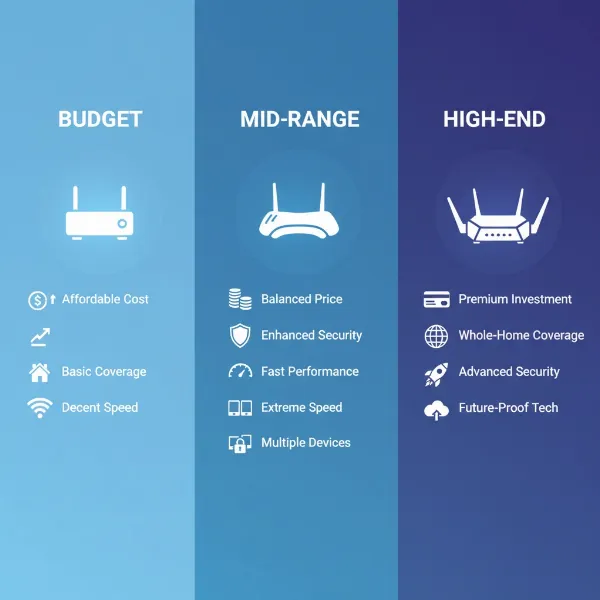
The market for Wifi 6 routers offers a wide spectrum of options, catering to every budget without compromising on the fundamental advantages of the standard. From essential upgrades to high-performance beasts, there’s a Wifi 6 router designed to fit your financial comfort zone while still delivering significant improvements over older Wi-Fi technologies.
Budget Segment (Under $100)
Routers in this segment offer an affordable entry point into Wifi 6 technology, providing notable performance boosts for essential internet tasks.
- Advantages: Price-conscious, delivers core Wifi 6 benefits like OFDMA and WPA3, suitable for small to medium homes and moderate device counts. These are perfect for upgrading from an older Wifi 5 router without a major financial outlay.
- Disadvantages: May have limited advanced features, lower overall theoretical speeds compared to more expensive models, and potentially less robust coverage in very large or complex environments. They typically lack multi-gig Ethernet ports.
- Suggested Products:
- TP-Link Archer AX10 (AX1500): Often considered the cheapest entry-level Wifi 6 router, offering speeds up to 600Mbps at close range and decent coverage for everyday use. It’s a solid upgrade for basic browsing and streaming.
- TP-Link Archer AX21 (AX1800): A slight step up, providing improved speeds and reliability, making it an excellent budget-friendly choice for most standard home networks.
Mid-Range Segment ($100-$300)
This is the sweet spot for many users, balancing cost with a significant leap in performance, features, and capacity.
- Advantages: Offers a strong balance between affordability and robust performance. These routers typically feature higher AX ratings, better range, more capable processors, and a richer set of features like advanced QoS, parental controls, and often mesh compatibility. They handle multiple 4K streams and high-speed downloads with ease.
- Disadvantages: May still lack some very high-end features found in premium models, such as extensive multi-gigabit port options or extreme processing power for intense gaming.
- Suggested Products:
- TP-Link Archer AX55 (AX3000): A popular choice for its excellent speed at close and mid-range, ample ports, and effective heat management. It provides great value for gigabit internet plans.
- ASUS RT-AX86U (AX5700): While sometimes leaning towards the higher end of this segment, it’s often recommended as an outstanding all-rounder, excelling in both general connectivity and dedicated gaming performance with a multi-gig WAN port and built-in security.
- eero 6 (Mesh System): For larger homes needing seamless coverage, a 2-pack eero 6 system offers reliable AX1800 speeds and smart home integration at a compelling price point, prioritizing ease of use and consistent signal.
Premium Segment (Over $300)
For enthusiasts, gamers, large households with extensive smart home ecosystems, or small offices, premium Wifi 6 routers deliver top-tier performance and advanced capabilities.
- Advantages: Unmatched performance with very high AX ratings (AX6000+), superior range and signal strength, often tri-band for dedicated high-bandwidth tasks, robust multi-gig Ethernet ports, powerful processors, and comprehensive software suites. These are built to handle the most demanding network loads and future-proof your setup.
- Disadvantages: The primary drawback is the higher cost, which might be overkill for average users.
- Suggested Products:
- GL.iNet Flint 2 (GL-MT6000) (AX6000): Often hailed as a top Wifi 6 router for its impressive range, excellent top speeds, and advanced configurability through OpenWRT, including dual 2.5Gbps WAN/LAN ports.
- ASUS ROG Rapture GT-AXE11000 (AXE11000 – Wifi 6E): While technically a Wifi 6E router (including the 6GHz band), its Wifi 6 capabilities are stellar. It’s a gaming powerhouse with blazing fast speeds, extensive ports, and dedicated gaming features, suited for the most demanding users.
- Netgear Nighthawk XR1000 (AX5400): A high-end gaming router specifically designed to minimize ping and optimize gaming traffic, often featuring advanced software for Geo-Filter and QoS, despite its premium price and dual-band configuration.
[image-3|wifi-6-router-price-tiers|Three distinct Wifi 6 routers, visually representing budget, mid-range, and premium tiers, arranged on a gradient background from light to dark, with subtle price tag icons.|
A clear, studio-shot image featuring three Wifi 6 routers. On the left, a simple, compact budget router. In the middle, a more substantial, multi-antenna mid-range router. On the right, a large, aggressively designed premium or gaming router. The background subtly transitions in color, and minimalist icons (e.g., a single coin for budget, a few coins for mid-range, a stack of coins for premium) are near each router to denote its price segment. The style is product photography, highlighting design differences.]
Expert Insight: “The Wifi 6 Sweet Spot”
“Many users find the mid-range Wifi 6 routers to be the ‘sweet spot’ for value. They offer a significant upgrade over older standards in terms of speed, capacity, and efficiency, providing an excellent experience for most modern homes without the premium price tag of Wifi 6E or Wifi 7.” – Sarah Jenkins, Senior Network Analyst.
Conclusion
Upgrading to a Wifi 6 router presents a compelling case for enhancing your home network experience, especially in today’s multi-device, high-bandwidth environment. With its advanced technologies like OFDMA and MU-MIMO, Wifi 6 delivers faster speeds, reduced latency, improved efficiency for numerous connected devices, and enhanced security with WPA3. Whether you’re a casual browser, an avid 4K streamer, a serious gamer, or building a smart home, a Wifi 6 router offers a noticeable improvement over older Wi-Fi standards.
Choosing the right model involves considering your specific usage needs, home size, budget, and desired features such as parental controls or advanced QoS. From budget-friendly options that provide essential upgrades to premium, feature-rich powerhouses, there’s a Wifi 6 router designed for every user. By making an informed decision, you can future-proof your network, ensure seamless connectivity, and say goodbye to frustrating buffering and slow connections. Is your current router truly keeping up with your digital demands?
Frequently Asked Questions
What is the main advantage of Wifi 6 over Wifi 5?
The primary advantage of Wifi 6 is its enhanced efficiency in handling multiple devices simultaneously. While it offers higher theoretical speeds, its real-world benefit comes from technologies like OFDMA and MU-MIMO, which allow the router to communicate with more devices at once, reducing latency and improving overall network performance in congested environments.
Do I need to upgrade all my devices to Wifi 6 to benefit from a Wifi 6 router?
No, Wifi 6 is backward-compatible with older Wi-Fi standards. Your existing Wifi 5 (802.11ac) and older devices will still connect to a Wifi 6 router. However, to experience the full benefits of Wifi 6, such as improved speed, efficiency, and lower latency, your client devices (smartphones, laptops, etc.) also need to support Wifi 6.
Can a Wifi 6 router improve my internet speed if I have a slow ISP plan?
A Wifi 6 router optimizes your local network performance, meaning it can make the most efficient use of the internet bandwidth you already have. If your internet service provider (ISP) plan is slow, a Wifi 6 router won’t magically increase that external speed. However, it will ensure that the speed you do pay for is distributed more efficiently and consistently to all your connected devices.
What is the difference between dual-band and tri-band Wifi 6 routers?
A dual-band Wifi 6 router operates on two frequency bands (2.4GHz and 5GHz). A tri-band router adds an additional 5GHz band (or a 6GHz band in the case of Wifi 6E). This third band provides extra capacity, which is particularly beneficial for high-bandwidth activities like 4K streaming or gaming, as it allows dedicated traffic separation to prevent congestion.
Is Wifi 6 better for gaming?
Yes, Wifi 6 offers significant improvements for gaming. Its lower latency, coupled with OFDMA and MU-MIMO, ensures more efficient data transmission, reducing lag, especially in households with multiple users. Many gaming-specific Wifi 6 routers also include Quality of Service (QoS) features to prioritize gaming traffic, further enhancing the online gaming experience.