In today’s hyper-connected world, an antiquated Wi-Fi router can transform seamless online experiences into a frustrating battle against slowdowns and dead zones. As our homes fill with an ever-increasing array of smart devices, from streaming media players to security cameras and smart appliances, the demands on our home networks have never been higher. The solution lies in upgrading to a Wi-Fi 6 router, a powerful piece of technology designed to handle these dense network environments with unparalleled efficiency and speed. This comprehensive guide will navigate you through the essential considerations, popular models, and crucial tips to help you select the perfect Wi-Fi 6 router, ensuring a robust and future-ready home network without any missteps.
Understanding Wi-Fi 6: Why the Upgrade Matters
Wi-Fi 6, also known by its technical standard 802.11ax, represents a significant leap forward in wireless technology. It’s engineered not just for raw speed, but for efficiency, especially in congested network environments with multiple connected devices. Key benefits include faster theoretical speeds, lower latency for more responsive online activities like gaming and video conferencing, and the ability to handle a greater number of simultaneous connections without compromising performance. Additionally, Wi-Fi 6 incorporates Target Wake Time (TWT), a feature that helps improve battery life for connected devices, and it supports the gold standard WPA3 encryption for enhanced network security.
While Wi-Fi 6 operates on the 2.4 GHz and 5 GHz bands, Wi-Fi 6E extends this capability by adding support for a less congested 6 GHz band. This tri-band functionality significantly reduces interference and provides a dedicated, super-fast highway for compatible devices. Although Wi-Fi 7 has recently emerged, offering even greater theoretical speeds and efficiencies, Wi-Fi 6 and 6E routers continue to provide exceptional value and a substantial upgrade for most households, effectively future-proofing your network for years to come.
Types of Wi-Fi 6 Routers for Every Need
Selecting the right Wi-Fi 6 router often depends on your specific needs, household size, and online activities. Routers are designed with varying capabilities to cater to different user profiles.
Classification by Usage
- For Small Homes/Apartments: For compact living spaces with a moderate number of devices, a dual-band Wi-Fi 6 router with good close-range performance and essential features is often sufficient. These models offer reliable speeds and stable connections without unnecessary overkill.
- For Large Homes/Multi-story Houses: Expansive homes or those with multiple levels frequently encounter Wi-Fi dead zones. In these scenarios, a mesh Wi-Fi 6 or 6E system is highly recommended. These systems use multiple units strategically placed throughout your home to create a unified network, ensuring seamless coverage everywhere. Many mesh systems also feature tri-band capabilities to optimize performance across nodes and devices.
- For Gaming & High Bandwidth Users: Gamers and users with intense bandwidth demands, such as 4K video streaming or large file transfers, should prioritize routers with specific features. Look for models offering multi-gig Ethernet ports (2.5 GbE or even 10 GbE) for wired connections, Quality of Service (QoS) to prioritize gaming traffic, and often a tri-band Wi-Fi 6E configuration to leverage the uncongested 6 GHz band for critical devices. Routers with dedicated gaming ports can also provide an edge.
- For Small Offices/Home Offices: For professional environments, reliability and security are paramount. Routers for small offices should feature robust security protocols like WPA3, potentially built-in VPN support for secure remote access, and ample Gigabit Ethernet ports for stable wired connections to workstations and servers.
|
Our Picks for the Best Wifi 6 router in 2026
As an Amazon Associate I earn from qualifying purchases.
|
||
| Num | Product | Action |
|---|---|---|
| 1 | NETGEAR Nighthawk WiFi 6 Router (RAX36) – Router Only, AX3000 3 Gbps Wireless Speed – Dual-Band Gigabit Internet – Covers 2,000 sq. ft., 25 Devices – Built-in VPN, USB 3.0, Gaming |

|
| 2 | TP-Link Smart WiFi 6 Router (Archer AX10) – 4 Gigabit LAN Ports, Dual Band 802.11AX Router, Beamforming, OFDMA, MU-MIMO, Parental Controls, Dual-Core 900MHz Processor, Works with Alexa |
|
| 3 | TP-Link AX1800 WiFi 6 Router (Archer AX21 V5) – Dual Band Wireless Internet, Gigabit, Easy Mesh, Works with Alexa - A Certified for Humans Device, Free Expert Support |
|
| 4 | TP-Link Deco X55 AX3000 WiFi 6 Mesh System - Covers up to 2500 Sq.Ft., Replaces Wireless Router and Extender, 3 Gigabit Ports, Supports Ethernet Backhaul, Deco X55(1-Pack) |
|
| 5 | TP-Link AXE5400 Tri-Band WiFi 6E Router (Archer AXE75), 2025 PCMag Editors' Choice, Gigabit Internet for Gaming & Streaming, New 6GHz Band, 160MHz, OneMesh, Quad-Core CPU, VPN & WPA3 Security |
|
| 6 | TP-Link Dual-Band BE3600 Wi-Fi 7 Router Archer BE230 | 4-Stream | 2×2.5G + 3×1G Ports, USB 3.0, 2.0 GHz Quad Core, 4 Antennas | VPN, EasyMesh, HomeShield, MLO, Private IOT | Free Expert Support |
|
| 7 | TP-Link Dual-Band AX3000 Wi-Fi 6 Router Archer AX55 | Wireless Gigabit Internet Router for Home | EasyMesh Compatible | VPN Clients & Server | HomeShield, OFDMA, MU-MIMO | USB 3.0 | Secure by Design |
|
| 8 | TP-Link AX5400 WiFi 6 Router (Archer AX73)- Dual Band Gigabit Wireless Internet Router for Streaming, Long Range Coverage |
|
| 9 | TP-Link Archer AX1450 WiFi 6 Dual-Band Wireless Router | up to 1.45 Gbps Speeds (Renewed) |
|
| 10 | ASUS RT-AX1800S Dual Band WiFi 6 Extendable Router, Subscription-Free Network Security, Parental Control, Built-in VPN, AiMesh Compatible, Gaming & Streaming, Smart Home |
|
Classification by Brand
Several manufacturers dominate the Wi-Fi 6 router market, each with its strengths:
- TP-Link: Known for offering a wide range of affordable yet high-performing Wi-Fi 6 routers and mesh systems. Their Archer series covers individual routers, while the Deco series specializes in whole-home mesh solutions, often striking an excellent balance between cost and capability.
- ASUS: A favorite among power users and gamers, ASUS provides routers with advanced features, powerful hardware, and robust firmware (like AiProtection Pro for security) that offer extensive customization. Their RT-AX series and ROG Rapture gaming routers are highly regarded for their performance and feature sets.
- Netgear: Offering premium performance with their Nighthawk series for traditional routers and the Orbi series for high-end mesh Wi-Fi systems, Netgear caters to users looking for top-tier speed and expansive coverage.
- Other Notable Brands: Linksys offers user-friendly options, while brands like GL.iNet are popular among those who prefer open-source firmware and deep configurability.
Key Criteria for Selecting Your Wi-Fi 6 Router
Making an informed decision requires understanding the specifications and features that truly impact your network performance.
Speed and Performance
Router speeds are often advertised with an “AX” rating (e.g., AX3000, AX5700, AXE11000), which represents the theoretical maximum aggregate bandwidth across all bands. While a higher number generally indicates more powerful hardware, real-world speeds will always be lower due to various environmental factors.
It’s crucial to match your router’s capability to your internet service provider’s (ISP) plan. Your router should comfortably exceed your maximum available data speed to avoid creating a bottleneck. The router’s internal components, such as its CPU and RAM, also play a significant role; more powerful processors and greater memory generally translate to better performance and the ability to handle more traffic.
Coverage and Range
Wi-Fi signals are susceptible to interference from walls, floors, distance, and other electronics. While routers often list an approximate maximum range, treat these as estimates. For larger homes or those with complex layouts, a single router may not suffice, leading to frustrating dead zones.
- Mesh Wi-Fi Systems: These are ideal for extending coverage across vast or multi-story homes. Multiple nodes work together to form a single, cohesive network, eliminating dead spots and providing consistent signal strength.
- Access Points: Another option for expanding coverage, access points typically connect to your wired Ethernet network and broadcast their own Wi-Fi signals, providing excellent speed and coverage in specific areas.
- Placement: Proper placement is paramount. Position your router in the most central location possible, elevated on a shelf or table, and away from obstructions like thick walls, metal objects, large appliances (especially microwaves), and even large bodies of water (like fish tanks).
Number of Connected Devices
Modern homes are teeming with internet-connected devices. A Wi-Fi 6 router excels in managing these dense networks through several key technologies:
- MU-MIMO (Multi-User, Multiple-Input, Multiple-Output): This technology allows your router to communicate with multiple devices simultaneously rather than sequentially. This significantly improves data speeds and efficiency, particularly for bandwidth-intensive tasks when many devices are active. Routers are often listed with a “4×4” or “8×8” MU-MIMO configuration, indicating the number of simultaneous streams.
- OFDMA (Orthogonal Frequency-Division Multiple Access): OFDMA optimizes frequency use by dividing a channel into smaller sub-channels. This is especially beneficial for smart home devices and IoT gadgets that send frequent small data packets, improving overall network efficiency and reducing latency.
- Dual-Band vs. Tri-Band: Dual-band routers broadcast on 2.4 GHz and 5 GHz. Tri-band routers add an additional 5 GHz band or the 6 GHz band (in Wi-Fi 6E models). This extra band helps distribute devices more effectively, dedicating high-bandwidth activities to less congested channels.
Security Features
Your router is the first line of defense for your home network. Look for these essential security features:
- WPA3 Encryption: This is the latest and most secure Wi-Fi Protected Access protocol, offering stronger encryption than its predecessors to safeguard your network password and data.
- Built-in Firewall: Most routers include a basic hardware firewall that filters incoming and outgoing network traffic, providing an additional layer of defense against unauthorized access.
- VPN Support: Many higher-end Wi-Fi 6 routers offer built-in VPN client functionality. This allows all devices connected to the router to automatically route their traffic through a VPN, providing network-wide encryption and anonymity without needing to install VPN software on each device.
- Parental Controls: These features allow you to filter content, set internet access schedules, and monitor online activity at the network level, offering peace of mind for families.
Wired Connectivity
While wireless performance is crucial, don’t overlook wired connectivity. Ethernet ports provide the most stable and fastest connections for devices like desktop PCs, gaming consoles, and smart TVs that are stationary and demand high bandwidth.
- Gigabit Ethernet Ports: Ensure your router has Gigabit (1000 Mbps) LAN ports. A common mistake is buying routers with outdated 10/100 Mbps Fast Ethernet ports, which will severely bottleneck your wired speeds, even if your internet plan is faster.
- Multi-Gig Ports: For advanced users with multi-gig internet plans or devices like NAS (Network Attached Storage) that can utilize extreme speeds, look for routers with 2.5 GbE or 10 GbE WAN/LAN ports.
- Link Aggregation: Some high-end routers allow you to combine two Ethernet ports to create a single, higher-bandwidth connection to a compatible device, further boosting wired performance.
Price and Value
Wi-Fi 6 routers are available across a wide spectrum of price points, from budget-friendly options to premium models.
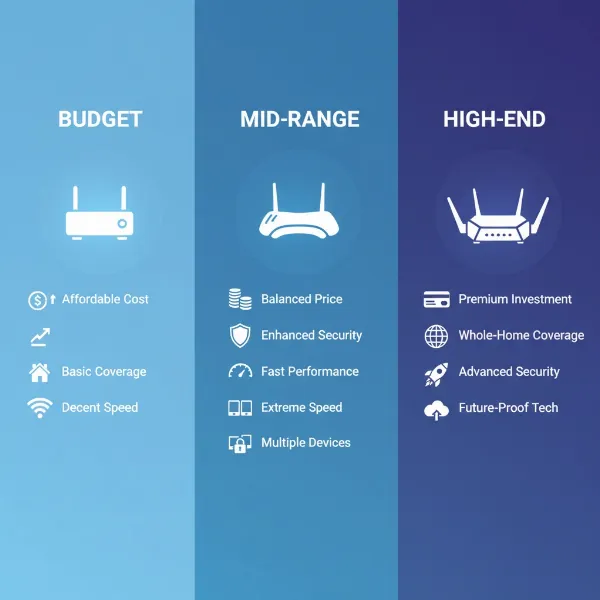
- Budget: These routers offer an accessible entry into Wi-Fi 6 technology, providing improved speeds and efficiency over older standards at an economical cost. They typically suit smaller homes with basic to moderate needs.
- Mid-Range: Striking a balance between cost and performance, mid-range routers offer enhanced features like better coverage, more robust processing, and sometimes even Wi-Fi 6E. They are suitable for most average-sized homes with diverse connected devices.
- Premium: These routers come with a higher price tag but deliver top-tier performance, extensive features (including Wi-Fi 6E, multi-gig ports, advanced QoS, and comprehensive security suites), and often superior build quality, ideal for large homes, competitive gamers, and tech enthusiasts.
Consider whether your purchase is a long-term or short-term upgrade. A basic router might work if you need a quick fix, but planning for future needs, such as a larger home or faster internet plan, can save you from another upgrade sooner than expected.
Common Mistakes to Avoid When Buying a Wi-Fi 6 Router
Choosing a new Wi-Fi 6 router can be straightforward if you know what to look for, but several common pitfalls can lead to a less-than-optimal experience. Avoiding these errors will ensure you make a smart investment.
First, underestimating your needs is a frequent mistake. Many users purchase a router without thoroughly evaluating their home size, the number of devices, or their actual internet speed. Always test your current internet speed directly from your modem and consider all connected devices, including smart home gadgets, to accurately gauge your network demands.
A critical error to avoid, particularly for those relying on wired connections, is ignoring Ethernet port speeds. Some budget Wi-Fi 6 routers still come with outdated 10/100 Mbps Fast Ethernet LAN ports. If you have an internet plan faster than 100 Mbps or transfer large files between wired devices, these ports will bottleneck your entire wired network. Always ensure your chosen router advertises “Gigabit” (1000 Mbps) or multi-gig (2.5 GbE, 10 GbE) Ethernet ports.
Another common pitfall is overspending on unused features. While Wi-Fi 6E and Wi-Fi 7 offer impressive capabilities, their full benefits are only realized with compatible devices and multi-gig internet plans. If you don’t have these, investing in the latest standard might be an unnecessary expense, and a high-quality Wi-Fi 6 router could serve you just as well, if not better, for less cost.
Poor router placement can negate the benefits of even the most powerful Wi-Fi 6 router. Hiding your router in a closet, behind a TV, or in a corner can severely impede signal strength and coverage. Optimal placement involves a central, elevated, and open location, away from potential interference sources like microwaves or large metal objects.
Neglecting security features can leave your network vulnerable. Always confirm that your prospective router supports WPA3 encryption. Additionally, features like built-in firewalls, router-level VPN capabilities, and robust parental controls add significant layers of protection and control.
Finally, not considering a mesh system for large or complex homes is a mistake often realized too late. A single powerful router, no matter how advanced, might struggle to cover multi-story homes or layouts with many walls effectively. Mesh Wi-Fi 6 systems are specifically designed to eliminate dead zones and provide seamless, wall-to-wall coverage.
By being mindful of these common errors, you can confidently choose a Wi-Fi 6 router that perfectly aligns with your home networking needs and delivers an optimal online experience.
Top Picks: Wi-Fi 6 Routers by Price Segment
To help you narrow down your choices, here are some top recommendations across different price categories, balancing performance with value.
Budget Segment (Under $100-$150)
For those seeking an affordable entry into Wi-Fi 6 without sacrificing essential performance, the budget segment offers capable options.
- Pros: Cost-effective, significant upgrade over older Wi-Fi standards, typically easy to set up.
- Cons: May lack advanced features like multi-gig ports, 6 GHz bands, or extensive customization. Range and maximum device capacity might be more limited than higher-end models.
- Gợi ý sản phẩm (Product Suggestions):
- TP-Link Archer AX55: Often praised for its excellent balance of speed and coverage at a budget-friendly price, making it ideal for smaller homes and apartments with gigabit internet plans. It typically features Gigabit Ethernet ports and good close-range speeds.
- TP-Link Archer AX10: An even more economical choice, offering basic Wi-Fi 6 benefits and adequate performance for everyday internet use in smaller spaces.
Mid-Range Segment ($150-$300)
This category offers a sweet spot, providing a solid blend of performance, features, and value for most average households.
- Pros: Good balance of speed and range, often includes advanced features like MU-MIMO, OFDMA, and robust security suites. Capable of handling multiple devices and demanding tasks.
- Cons: May not have the absolute fastest multi-gig ports or dedicated 6 GHz bands found in premium Wi-Fi 6E/7 models.
- Gợi ý sản phẩm (Product Suggestions):
- ASUS RT-AX86U: Despite being an older Wi-Fi 6 model (not 6E), it remains a highly recommended dual-band router for its powerful performance, excellent close-range speeds, and a dedicated gaming port. It also often includes comprehensive security software.
- eero 6: A popular choice for those needing a mid-range mesh Wi-Fi 6 system, offering seamless whole-home coverage and ease of use, suitable for internet connections up to around 700 Mbps.
Premium Segment (Over $300)
The premium segment is where you find cutting-edge performance, extensive features, and often Wi-Fi 6E capabilities, designed for the most demanding users and large homes.
- Pros: Blazing-fast speeds, superior coverage, multi-gig Ethernet ports, tri-band (including 6 GHz for Wi-Fi 6E), advanced gaming features (QoS), and robust security. Ideal for competitive gaming, 8K streaming, and smart homes with many high-bandwidth devices.
- Cons: High price point, and some features may only be fully utilized with compatible devices and high-speed internet plans.
- Gợi ý sản phẩm (Product Suggestions):
- ASUS ROG Rapture GT-AXE11000: A top-tier Wi-Fi 6E gaming router known for its incredibly fast close-range speeds on the 6 GHz band, numerous ports (including multi-gig), and extensive gaming-specific features and customization options.
- TP-Link Deco XE75: An excellent and more affordable Wi-Fi 6E mesh system for large homes, offering tri-band connectivity, impressive speeds, and comprehensive coverage, all managed through a user-friendly app.
- ExpressVPN Aircove Wi-Fi 6 Router: A specialized option for VPN users, offering network-wide VPN support, making it easy to secure all connected devices, alongside solid Wi-Fi 6 performance in a compact design.
Conclusion
Choosing the right Wi-Fi 6 router is a pivotal step towards building a fast, reliable, and secure home network that can effortlessly handle today’s—and tomorrow’s—digital demands. By carefully considering factors such as your true internet speed, the size and layout of your home, the number and type of devices you connect, and essential features like security and wired connectivity, you can make an informed decision. Embracing Wi-Fi 6 technology offers not just an upgrade in speed, but a significant boost in efficiency, capacity, and security, paving the way for a truly seamless online experience. A well-selected Wi-Fi 6 router is more than just a piece of hardware; it’s the foundation of a modern, connected home.
What steps will you take to ensure your next Wi-Fi 6 router is the perfect fit for your evolving digital lifestyle?
Câu Hỏi Thường Gặp
When should I replace my old router?
A high-quality Wi-Fi router typically lasts three to five years. You should consider upgrading sooner if you experience frequent connectivity drops, consistently slow speeds despite a fast internet plan, or if your current router no longer receives critical security updates from its manufacturer. Upgrading to a Wi-Fi 6 or 6E router is also advisable if you’re a power user with many smart devices, 4K streaming, or online gaming.
What’s the difference between Wi-Fi 6 and Wi-Fi 6E?
Both Wi-Fi 6 and Wi-Fi 6E utilize the same core technologies, but Wi-Fi 6E adds support for the 6 GHz radio band. This additional band is significantly less congested, offering faster speeds and lower latency, especially for newer, compatible devices. Wi-Fi 6 operates on the 2.4 GHz and 5 GHz bands, while Wi-Fi 6E provides tri-band connectivity (2.4 GHz, 5 GHz, and 6 GHz).
Do I need a mesh Wi-Fi system?
You likely need a mesh Wi-Fi system if you live in a large home, a multi-story house, or experience Wi-Fi dead zones in certain areas. A single traditional router often struggles to provide consistent coverage across expansive or complex layouts. Mesh systems use multiple interconnected units to create a unified network, extending reliable Wi-Fi coverage to every corner of your home.
Can my old devices connect to a Wi-Fi 6 router?
Yes, Wi-Fi 6 routers are fully backward compatible, meaning your older Wi-Fi 5 (802.11ac) or even older devices will still be able to connect and function. However, to experience the full benefits of Wi-Fi 6, such as increased speeds, lower latency, and improved efficiency, both your router and your connected devices need to support the Wi-Fi 6 standard.
Is Wi-Fi 7 better than Wi-Fi 6/6E?
Technically, Wi-Fi 7 (802.11be) offers even greater theoretical speeds (up to 46 Gbps), higher bandwidth, and more advanced features like Multi-Link Operation (MLO) compared to Wi-Fi 6/6E (max 9.6 Gbps). However, Wi-Fi 7 is often overkill for most users today unless you have a multi-gig internet plan and multiple Wi-Fi 7 compatible client devices. Wi-Fi 6 and 6E remain excellent, value-driven choices.
What is the most important feature for gaming routers?
For gaming routers, low latency is paramount. Key features include Quality of Service (QoS) settings to prioritize gaming traffic, multi-gig Ethernet ports for stable wired connections to consoles or PCs, and ideally a tri-band Wi-Fi 6E router to utilize the uncongested 6 GHz band for critical gaming devices. Robust processors and ample RAM also contribute to overall responsiveness.